If you are learning Node.js, one of the most important concepts you need to understand is
asynchronous programming.
Node.js is designed to handle many operations asynchronously. Instead of waiting for one operation to finish before starting another, Node.js can continue doing other work while waiting for tasks such as file operations, database queries, or API requests to complete.
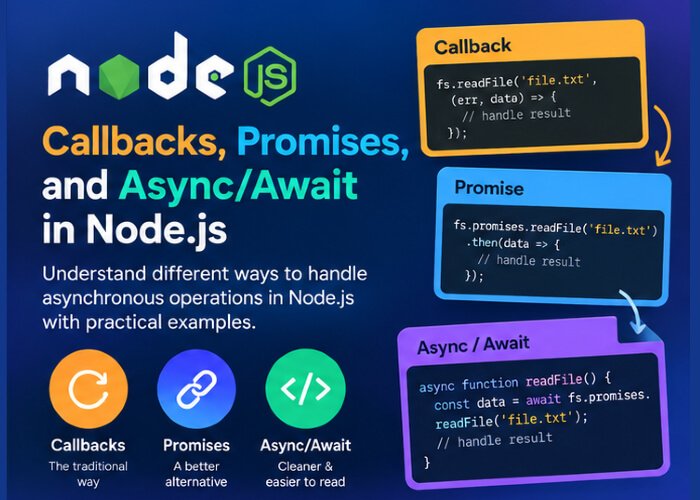
To work with asynchronous operations in Node.js, you will commonly encounter three approaches:
- Callbacks
- Promises
- Async/Await
In this article, we will understand each approach with simple examples and learn why modern Node.js applications generally prefer Promises and
async/await.
What is Asynchronous Programming?
Let’s first understand the difference between synchronous and asynchronous programming.
Synchronous Code
In synchronous programming, tasks are generally executed one after another.
For example:
console.log("First");

console.log("Second");

console.log("Third");
The output is:
First
Second
Third
Each statement runs in order.
If a particular operation takes a long time, the next operation generally has to wait for it.
Asynchronous Code
With asynchronous programming, an operation can start and allow other code to continue while it is waiting to complete.
For example:
console.log("First");

setTimeout(() => {
    console.log("Second");
}, 2000);

console.log("Third");
The output is:
First
Third
Second
Why?
The
setTimeout() operation schedules its callback and allows the rest of the code to continue.
After approximately two seconds, the callback executes.
This is the basic idea behind asynchronous programming.
Why is Asynchronous Programming Important in Node.js?
Node.js is commonly used for applications that perform many I/O operations, such as:
- Reading files
- Writing files
- Database operations
- Sending HTTP requests
- Calling APIs
- Processing network requests
- Working with streams
Suppose your server receives a request and needs to read information from a database.
If the server had to completely stop and wait for every database operation, handling many users could become inefficient.
Node.js uses an event-driven, non-blocking approach so that it can continue handling other work while asynchronous operations are in progress.
This is why understanding asynchronous programming is essential for Node.js developers.
What is a Callback?
A
callback is a function that is passed to another function and executed later.
For example:
function greet(name, callback) {
    console.log(`Hello, ${name}`);

    callback();
}

function finished() {
    console.log("Greeting completed");
}

greet("John", finished);
Output:
Hello, John
Greeting completed
Here:
finished
is passed as a callback to the
greet() function.
The
greet() function calls it using:
callback();
Callbacks in Asynchronous Operations
Callbacks become especially useful when working with asynchronous operations.
For example:
setTimeout(() => {
    console.log("Operation completed");
}, 2000);
The function:
() => {
    console.log("Operation completed");
}
is a callback.
It runs after the timer completes.
Node.js Callback Example
Node.js provides many APIs that traditionally use callbacks.
For example, the File System module can read a file asynchronously:
const fs = require("fs");

fs.readFile("data.txt", "utf8", (error, data) => {
    if (error) {
        console.error(error);
        return;
    }

    console.log(data);
});
The callback receives two common values:
(error, data)
The first value represents an error, if one occurred.
The second contains the result when the operation succeeds.
The Error-First Callback Pattern
Node.js commonly uses an
error-first callback pattern.
For example:
function(error, result) {
    // Handle result or error
}
The first argument represents an error.
If the operation succeeds:
error
is usually
null.
For example:
fs.readFile("data.txt", "utf8", (error, data) => {
    if (error) {
        console.error(error);
        return;
    }

    console.log(data);
});
This pattern was very common in older Node.js applications and is still present in many Node.js APIs.
The Problem with Too Many Callbacks
Callbacks work, but complex applications can become difficult to read when many asynchronous operations depend on each other.
For example:
getUser(userId, (error, user) => {
    if (error) {
        return console.error(error);
    }

    getOrders(user.id, (error, orders) => {
        if (error) {
            return console.error(error);
        }

        getProducts(orders, (error, products) => {
            if (error) {
                return console.error(error);
            }

            console.log(products);
        });
    });
});
When callbacks become deeply nested, the code can become harder to read and maintain.
This style is sometimes called
callback hell or the
pyramid of doom.
Promises were introduced as a cleaner way to handle asynchronous operations.
What is a Promise?
A
Promise represents the eventual result of an asynchronous operation.
A Promise can be in one of three states:
- Pending
- Fulfilled
- Rejected
Pending
The operation is still running.
Fulfilled
The operation completed successfully.
Rejected
The operation failed.
You can think of a Promise as a value that will be available sometime in the future.
Creating a Promise
You can create a Promise using the
Promise constructor:
const promise = new Promise((resolve, reject) => {
    // asynchronous operation

    resolve("Operation successful");
});
Here:
resolve()
indicates that the operation succeeded.
And:
reject()
indicates that the operation failed.
For example:
const promise = new Promise((resolve, reject) => {
    const success = true;

    if (success) {
        resolve("Task completed");
    } else {
        reject("Task failed");
    }
});
Using a Promise with then()
The
.then() method is used to handle a successfully fulfilled Promise.
promise.then((result) => {
    console.log(result);
});
Output:
Task completed
Handling Promise Errors with catch()
The
.catch() method is used when a Promise is rejected.
promise
    .then((result) => {
        console.log(result);
    })
    .catch((error) => {
        console.error(error);
    });
This gives you a cleaner way to handle asynchronous success and failure.
Using finally()
Promises also support
.finally().
The code inside
finally() runs after the Promise settles, regardless of whether it was fulfilled or rejected.
For example:
promise
    .then((result) => {
        console.log(result);
    })
    .catch((error) => {
        console.error(error);
    })
    .finally(() => {
        console.log("Operation finished");
    });
A Practical Promise Example
Let’s create a simple function that returns a Promise:
function getUser() {
    return new Promise((resolve, reject) => {
        setTimeout(() => {
            resolve({
                id: 1,
                name: "John"
            });
        }, 1000);
    });
}
We can use it like this:
getUser()
    .then((user) => {
        console.log(user);
    })
    .catch((error) => {
        console.error(error);
    });
After approximately one second, the user object is returned.
Promise Chaining
One of the major advantages of Promises is that asynchronous operations can be chained.
For example:
getUser()
    .then((user) => {
        return getOrders(user.id);
    })
    .then((orders) => {
        return getProducts(orders);
    })
    .then((products) => {
        console.log(products);
    })
    .catch((error) => {
        console.error(error);
    });
Each
.then() can return another Promise.
This makes complex asynchronous workflows easier to structure than deeply nested callbacks.
What is Async/Await?
async/await provides a cleaner syntax for working with Promises.
Instead of writing:
getUser()
    .then((user) => {
        console.log(user);
    })
    .catch((error) => {
        console.error(error);
    });
you can write:
async function showUser() {
    try {
        const user = await getUser();

        console.log(user);
    } catch (error) {
        console.error(error);
    }
}
The code is easier to read because it looks similar to synchronous code while still working with asynchronous Promises.
The async Keyword
The
async keyword is used to define an asynchronous function.
For example:
async function greet() {
    return "Hello";
}
An important point is that an
async function always returns a Promise.
For example:
async function getMessage() {
    return "Hello Node.js";
}

getMessage().then((message) => {
    console.log(message);
});
Output:
Hello Node.js
Even though the function returns a string, the
async keyword causes the function to return a Promise that fulfills with that string.
The await Keyword
The
await keyword is used inside an
async function to wait for a Promise to settle.
For example:
async function getUserData() {
    const user = await getUser();

    console.log(user);
}
Here:
const user = await getUser();
waits for the
getUser() Promise to fulfill before continuing within that async function.
Importantly, this does
not mean that Node.js blocks the entire server while waiting.
Handling Errors with async/await
A common way to handle errors with
async/await is
try...catch.
async function getUserData() {
    try {
        const user = await getUser();

        console.log(user);
    } catch (error) {
        console.error(error);
    }
}
If the Promise is rejected, the error is caught by:
catch
This approach is often easier to read than a long chain of
.then() and
.catch() calls.
Callback vs Promise vs Async/Await
Let’s compare the three approaches.
Callback
getUser((error, user) => {
    if (error) {
        console.error(error);
        return;
    }

    console.log(user);
});
Promise
getUser()
    .then((user) => {
        console.log(user);
    })
    .catch((error) => {
        console.error(error);
    });
Async/Await
async function showUser() {
    try {
        const user = await getUser();

        console.log(user);
    } catch (error) {
        console.error(error);
    }
}
All three approaches can handle asynchronous operations, but they have different syntax and characteristics.
Converting Callback-Based Code to Promises
Node.js provides a utility that can help convert many callback-style functions into Promise-based functions.
For example, with the File System module:
const fs = require("fs");
const { promisify } = require("util");

const readFile = promisify(fs.readFile);
You can then use:
readFile("data.txt", "utf8")
    .then((data) => {
        console.log(data);
    })
    .catch((error) => {
        console.error(error);
    });
However, many modern Node.js APIs already provide Promise-based versions, so
promisify() is not always necessary.
Using the Promise-Based File System API
Modern Node.js provides Promise-based APIs directly.
For example:
const fs = require("fs/promises");

async function readData() {
    try {
        const data = await fs.readFile("data.txt", "utf8");

        console.log(data);
    } catch (error) {
        console.error(error);
    }
}

readData();
This is much easier to read than deeply nested callbacks.
Sequential Asynchronous Operations
Sometimes one operation depends on the result of another.
For example:
async function processUser() {
    try {
        const user = await getUser();

        const orders = await getOrders(user.id);

        console.log(orders);
    } catch (error) {
        console.error(error);
    }
}
Here, the second operation requires the result of the first.
The operations therefore need to happen in sequence.
Running Independent Promises in Parallel
Sometimes operations are independent of each other.
For example:
async function loadData() {
    const usersPromise = getUsers();
    const productsPromise = getProducts();

    const [users, products] = await Promise.all([
        usersPromise,
        productsPromise
    ]);

    console.log(users);
    console.log(products);
}
Promise.all() allows independent asynchronous operations to run concurrently rather than waiting for one to finish before starting the next.
This can improve performance when the operations do not depend on each other.
Promise.all()
Promise.all() accepts an array of Promises.
const results = await Promise.all([
    promise1,
    promise2,
    promise3
]);
If all Promises fulfill, you receive their results.
If one of the Promises rejects,
Promise.all() rejects.
For example:
const results = await Promise.all([
    getUsers(),
    getProducts(),
    getOrders()
]);
The result is an array containing the corresponding results.
Promise.allSettled()
Sometimes you want to know the result of every Promise, even if some operations fail.
In that situation,
Promise.allSettled() can be useful.
const results = await Promise.allSettled([
    getUsers(),
    getProducts(),
    getOrders()
]);
It provides the status of each operation.
A result can have a status such as:
fulfilled
or:
rejected
This is useful when one failed operation should not prevent you from examining the results of the others.
Promise.race()
Promise.race() settles when the first Promise settles.
For example:
const result = await Promise.race([
    request1,
    request2
]);
Whichever Promise settles first determines the result.
This can be useful in certain timeout or competing-operation scenarios.
Avoiding Unnecessary await
Consider:
const users = await getUsers();
const products = await getProducts();
If
getUsers() and
getProducts() are completely independent, this makes the second operation start only after the first one has completed.
Instead, you can use:
const [users, products] = await Promise.all([
    getUsers(),
    getProducts()
]);
This allows both operations to proceed concurrently.
Common Mistakes with Async/Await
Mistake 1: Forgetting await
For example:
const user = getUser();

console.log(user.name);
If
getUser() returns a Promise,
user is a Promise rather than the actual user object.
Use:
const user = await getUser();
inside an appropriate async context.
Mistake 2: Forgetting Error Handling
Avoid leaving important asynchronous operations without error handling.
Use:
try {
    const data = await getData();
} catch (error) {
    console.error(error);
}
Mistake 3: Using await for Independent Operations Sequentially
Instead of:
const users = await getUsers();
const products = await getProducts();
consider:
const [users, products] = await Promise.all([
    getUsers(),
    getProducts()
]);
when the operations are independent.
Mistake 4: Using await Outside an Appropriate Context
In CommonJS code,
await generally needs to be inside an
async function.
For example:
async function main() {
    const data = await getData();

    console.log(data);
}

main();
ES Modules also support top-level
await in appropriate module contexts.
Real-World Example with Express.js
Async/await becomes especially useful when working with Express.js and databases or external APIs.
For example:
app.get("/users", async (req, res) => {
    try {
        const users = await getUsersFromDatabase();

        res.json(users);
    } catch (error) {
        console.error(error);

        res.status(500).json({
            message: "Unable to retrieve users"
        });
    }
});
This is a common pattern in Node.js applications.
The route handler is asynchronous, waits for the database operation, and sends a response when the operation completes.
Best Practices for Asynchronous Node.js Code
Keep these practices in mind when working with asynchronous operations.
Prefer async/await for Readability
For new application code,
async/await is often easier to read and maintain than deeply nested callbacks.
Handle Errors
Use
try...catch or appropriate Promise error handling.
Use Promise.all() When Appropriate
Run independent asynchronous operations concurrently when doing so is safe and useful.
Avoid Callback Nesting
If callback-based code becomes deeply nested, consider restructuring it or using Promise-based APIs.
Don’t Block the Event Loop
Avoid expensive synchronous operations in request-handling paths when they could block the server from processing other work.
Understand the Difference Between Sequential and Concurrent Work
Not every
await should be executed one after another. Identify which operations actually depend on each other.
Callback, Promise, and Async/Await: Quick Comparison
| Feature |
Callback |
Promise |
Async/Await |
| Syntax |
Function passed to another function |
.then() / .catch() |
async / await |
| Error handling |
Error-first convention |
.catch() |
try...catch |
| Readability |
Can become difficult when nested |
Better |
Usually easiest to read |
| Chaining |
Can become nested |
Supported |
Straightforward |
| Modern Node.js code |
Still used |
Common |
Very common |
| Best for beginners |
Basic concept |
Important |
Recommended approach to learn |
Conclusion
Asynchronous programming is a fundamental part of Node.js development.
The three approaches you should understand are:
Callbacks
Functions that are executed after an operation completes.
doSomething((error, result) => {
    // Handle result
});
Promises
Objects representing the eventual completion or failure of an asynchronous operation.
doSomething()
    .then(result => {
        console.log(result);
    })
    .catch(error => {
        console.error(error);
    });
Async/Await
A cleaner syntax for working with Promises.
async function run() {
    try {
        const result = await doSomething();

        console.log(result);
    } catch (error) {
        console.error(error);
    }
}
For modern Node.js development, you should be comfortable with
all three, because you will encounter callback-based code in existing projects and APIs, while Promises and
async/await are widely used for modern asynchronous programming.
Once you understand callbacks, Promises, and
async/await, you are ready to explore more practical Node.js topics such as
working with the File System, HTTP requests, APIs, databases, and Express.js applications.