






Components in React (Functional vs Class Components)
So far, you’ve set up a React project and learned how JSX lets you describe UI in a readable way. But real applications aren’t built as one giant block of markup — they’re broken down into small, reusable, self-contained pieces called components.
Components are the single most important concept in React. Once you understand them well, everything else — props, state, hooks — builds naturally on top of this foundation.
What Is a Component?
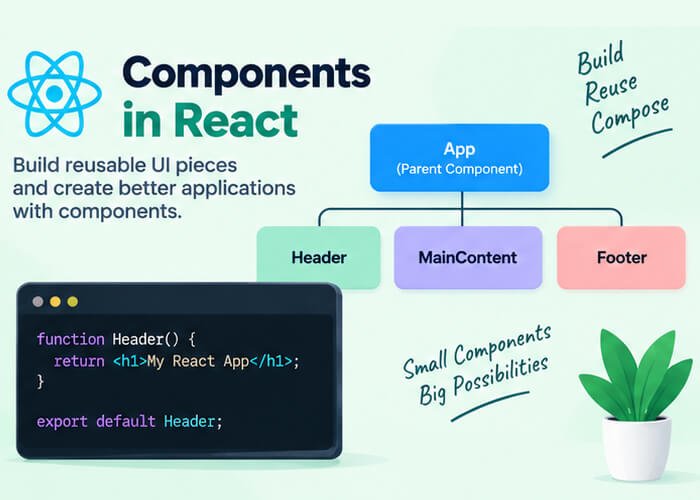
A component is simply a JavaScript function (or class) that returns a piece of UI, described using JSX. Think of components as custom, reusable building blocks — similar to how you’d use <div> or <button> in HTML, except you define exactly what they render and how they behave.
For example, instead of writing this navbar markup on every page:
<nav>
  <img src="logo.png" alt="Logo" />
  <ul>
    <li>Home</li>
    <li>About</li>
    <li>Contact</li>
  </ul>
</nav>
You can define it once as a Navbar component and reuse it anywhere:
<Navbar />This is the core idea behind React’s component-based architecture — build small, focused pieces, then compose them together to form complete pages.
Types of Components in React
React supports two ways of writing components:
- Functional Components (the modern, recommended approach)
- Class Components (the older approach, still found in legacy codebases)
Let’s look at both.
Functional Components
A functional component is just a JavaScript function that returns JSX.
function Welcome() {
  return <h1>Welcome to our website!</h1>
}

export default Welcome
You can also write it as an arrow function, which is very common in modern React code:
const Welcome = () => {
  return <h1>Welcome to our website!</h1>
}

export default Welcome
To use this component elsewhere in your app, you simply import it and render it like an HTML tag:
import Welcome from './Welcome'

function App() {
  return (
    <div>
      <Welcome />
    </div>
  )
}
Why Functional Components Are Preferred Today
Before 2019, functional components were limited — they couldn’t hold their own state or use lifecycle methods, so class components were required for anything interactive. That changed with the introduction of Hooks (like useState and useEffect), which gave functional components the same capabilities as class components, but with much less boilerplate.
Since then, functional components have become the industry standard, and most new React code — including official documentation and tutorials — is written this way.
Class Components
Class components are written using ES6 class syntax and extend React’s built-in Component class.
import React, { Component } from 'react'

class Welcome extends Component {
  render() {
    return <h1>Welcome to our website!</h1>
  }
}

export default Welcome
A few things to notice:
- The class must extend
React.Component - It must include a
render()method that returns JSX - It’s imported and used exactly the same way as a functional component:
<Welcome />
Adding State in a Class Component
Class components manage state using this.state and update it with this.setState():
import React, { Component } from 'react'

class Counter extends Component {
  constructor(props) {
    super(props)
    this.state = { count: 0 }
  }

  increment = () => {
    this.setState({ count: this.state.count + 1 })
  }

  render() {
    return (
      <div>
        <p>Count: {this.state.count}</p>
        <button onClick={this.increment}>Increment</button>
      </div>
    )
  }
}

export default Counter
Compare this to how the same component looks using a functional component with the useState hook:
import { useState } from 'react'

function Counter() {
  const [count, setCount] = useState(0)

  return (
    <div>
      <p>Count: {count}</p>
      <button onClick={() => setCount(count + 1)}>Increment</button>
    </div>
  )
}

export default Counter
Notice how much shorter and easier to read the functional version is — no constructor, no this keyword, no binding methods. This difference becomes even more significant in larger, more complex components.
Functional vs Class Components: Key Differences
| Aspect | Functional Component | Class Component |
|---|---|---|
| Syntax | Plain JavaScript function | ES6 class extending React.Component |
| State | Managed with the useState hook | Managed with this.state and this.setState() |
| Lifecycle methods | Handled with the useEffect hook | Methods like componentDidMount, componentDidUpdate |
this keyword | Not needed | Required, and often a source of bugs |
| Boilerplate | Minimal | More verbose |
| Current recommendation | ✅ Preferred approach | Mostly seen in legacy code |
| Performance | Slightly better in most cases due to simpler internals | Marginally more overhead |
Do You Need to Learn Class Components?
Since almost all new React projects use functional components with hooks, you don’t need to write class components yourself. However, it’s still worth being able to read and understand them because:
- Many older tutorials, Stack Overflow answers, and production codebases still use class components
- Some legacy enterprise applications haven’t migrated to functional components yet
- Understanding lifecycle methods in class components makes it easier to understand what
useEffectis doing internally
For this blog series, going forward, we’ll exclusively use functional components with hooks, since that reflects how React is written today.
Component Naming Rules
React has a strict rule: component names must start with a capital letter.
function welcome() {   // ❌ Won't be treated as a component
  return <h1>Hi</h1>
}

function Welcome() {   // ✅ Correct
  return <h1>Hi</h1>
}
This matters because JSX uses the capitalization to distinguish between a custom component (<Welcome />) and a regular HTML tag (<welcome>, which React would treat as an actual HTML element, not your component).
Composing Components Together
Real applications are built by nesting components inside one another. For example:
function Header() {
  return <h1>My Blog</h1>
}

function Footer() {
  return <p>© 2026 My Blog. All rights reserved.</p>
}

function App() {
  return (
    <div>
      <Header />
      <p>Welcome to my blog homepage!</p>
      <Footer />
    </div>
  )
}

export default App
Here, App is the parent component, and Header and Footer are its child components. This pattern of composing small components into larger ones scales naturally — even the biggest React applications are, at their core, just trees of components nested inside a single root component.
Common Mistakes Beginners Make
- Forgetting to capitalize component names, which causes React to treat them as invalid HTML tags instead of components.
- Forgetting to
exportandimportcomponents correctly between files. - Mixing hooks into class components — hooks only work inside functional components.
- Returning multiple elements without a wrapping tag or Fragment (a JSX rule we covered in the previous post).
- Overcomplicating a single component instead of breaking it into smaller, focused ones.
Recap
In this post, you learned:
- What a component is and why React apps are built using them
- The difference between functional components and class components
- Why functional components with hooks are the modern, preferred approach
- How to compose multiple components together to build a UI
- Component naming rules and common mistakes to avoid
Now that you understand how to structure your UI using components, the next step is learning how to pass data between them. In the next post, we’ll explore Props — how components communicate with each other in React.


2 Comments
Pingback: JSX in React - Developers Ground
Pingback: React JS Introduction - Developers Ground