








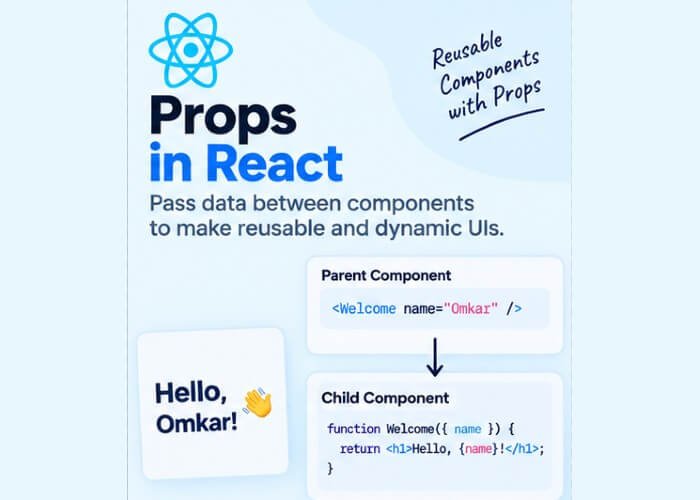
Props in React – Passing Data Between Components
In the last post, you learned how to break your UI into reusable components. But a component that always renders the exact same thing isn’t very useful. What if you want a Greeting component that says “Hello, John” in one place and “Hello, Sarah” in another? That’s exactly the problem props solve.
Props allow you to pass data from one component to another, making your components dynamic, reusable, and configurable.
What Are Props?
Props (short for “properties”) are how data flows from a parent component to a child component in React. They work similarly to function arguments — you pass values in, and the component uses them to render dynamic output.
Here’s the simplest possible example:
function Greeting(props) {
  return <h1>Hello, {props.name}!</h1>
}

function App() {
  return (
    <div>
      <Greeting name="John" />
      <Greeting name="Sarah" />
      <Greeting name="Alex" />
    </div>
  )
}

export default App
This renders:
Hello, John!
Hello, Sarah!
Hello, Alex!
Notice how the same component (Greeting) produces different output depending on what data is passed to it. This is the entire point of props — one component, many use cases.
How Props Work Under the Hood
When you write:
<Greeting name="John" />React internally packages name="John" into an object and passes it as the first argument to your component function:
{ name: "John" }So inside the Greeting component, props is just a regular JavaScript object, and props.name accesses the value you passed in.
You can pass as many props as you like:
<Greeting name="John" age={25} isVerified={true} />Inside the component:
function Greeting(props) {
  return (
    <div>
      <h1>Hello, {props.name}!</h1>
      <p>Age: {props.age}</p>
      <p>Verified: {props.isVerified ? "Yes" : "No"}</p>
    </div>
  )
}
Notice that string values are passed with quotes (name="John"), while non-string values (numbers, booleans, objects, arrays) are wrapped in curly braces (age={25}).
Destructuring Props
Writing props.name, props.age, props.isVerified repeatedly can get tedious. A cleaner and much more common pattern is to destructure props directly in the function’s parameter list:
function Greeting({ name, age, isVerified }) {
  return (
    <div>
      <h1>Hello, {name}!</h1>
      <p>Age: {age}</p>
      <p>Verified: {isVerified ? "Yes" : "No"}</p>
    </div>
  )
}
This is functionally identical to the previous example, but noticeably cleaner. You’ll see this destructuring pattern used almost everywhere in real-world React code.
Passing Different Data Types as Props
Props aren’t limited to strings and numbers — you can pass virtually any JavaScript value, including arrays, objects, and even functions.
Passing an Array
jsx
function FruitList({ fruits }) {
  return (
    <ul>
      {fruits.map((fruit, index) => (
        <li key={index}>{fruit}</li>
      ))}
    </ul>
  )
}

function App() {
  return <FruitList fruits={["Apple", "Banana", "Mango"]} />
}
Passing an Object
function UserCard({ user }) {
  return (
    <div>
      <h2>{user.name}</h2>
      <p>{user.email}</p>
    </div>
  )
}

function App() {
  const userInfo = { name: "Emma Watson", email: "emma@example.com" }
  return <UserCard user={userInfo} />
}
Passing a Function
This is especially important — passing functions as props is how child components communicate back to parent components, which we’ll explore in more depth in a later post on event handling.
function Button({ onClick, label }) {
  return <button onClick={onClick}>{label}</button>
}

function App() {
  const handleClick = () => {
    alert("Button was clicked!")
  }

  return <Button onClick={handleClick} label="Click Me" />
}
Props Are Read-Only
This is one of the most important rules in React: a component must never modify the props it receives.
function Greeting(props) {
  props.name = "Changed!" // ❌ Never do this
  return <h1>Hello, {props.name}!</h1>
}
React follows a strict one-way data flow (also called “unidirectional data flow”) — data moves from parent to child, never the other way around directly. If a child needs to change something, it does so by calling a function passed down from the parent (as shown in the button example above), not by mutating props directly.
This rule keeps your data flow predictable, and it’s part of what makes React apps easier to debug compared to frameworks with two-way data binding.
The Special children Prop
React has a built-in prop called children that lets you pass JSX between a component’s opening and closing tags, rather than as an attribute.
function Card({ children }) {
  return <div className="card">{children}</div>
}

function App() {
  return (
    <Card>
      <h2>Product Title</h2>
      <p>Product description goes here.</p>
    </Card>
  )
}
Here, everything between <Card> and </Card> becomes the children prop automatically. This pattern is extremely useful for building generic wrapper components — like modals, cards, or layout containers — that don’t need to know exactly what content they’ll display.
Default Props
Sometimes you want a prop to have a fallback value if the parent doesn’t provide one. You can do this with default parameter values in JavaScript:
function Greeting({ name = "Guest" }) {
  return <h1>Hello, {name}!</h1>
}

function App() {
  return (
    <div>
      <Greeting name="John" />
      <Greeting /> {/* Will render "Hello, Guest!" */}
    </div>
  )
}
Props vs State: A Quick Preview
You’ll often hear props and state mentioned together, so here’s a quick distinction to keep in mind (we’ll cover state in full detail in the next post):
| Props | State | |
|---|---|---|
| Who sets it | Parent component | The component itself |
| Can it change? | No (read-only) | Yes (via setState / useState) |
| Purpose | Configure/customize a component from outside | Manage data that changes over time within a component |
Think of props as input parameters for a component, and state as a component’s internal memory.
Common Mistakes Beginners Make
- Trying to mutate props directly instead of treating them as read-only.
- Forgetting to destructure, leading to repetitive
props.xyzeverywhere. - Passing the wrong data type — for example, forgetting curly braces for numbers/booleans (
age="25"passes a string, not a number). - Not providing default values, causing
undefinedto show up in the UI when a prop is missing. - Confusing props with state early on — remember, props come from outside; state lives inside.
Recap
In this post, you learned:
- What props are and how they let you pass data from parent to child components
- How to destructure props for cleaner code
- How to pass strings, numbers, booleans, arrays, objects, and functions as props
- Why props are read-only and how one-way data flow works in React
- The special
childrenprop and how to set default prop values
Now that you know how to pass data into a component, the next question is: how does a component manage data that changes over time — like a counter, a form input, or a toggle switch? That’s exactly what we’ll cover in the next post on State.


2 Comments
Pingback: React JS Introduction - Developers Ground
Pingback: Components in React - Developers Ground