








Introduction
we learned how to package reusable logic using functions. Now, it’s time to tackle one of the most essential data structures in programming: Arrays.
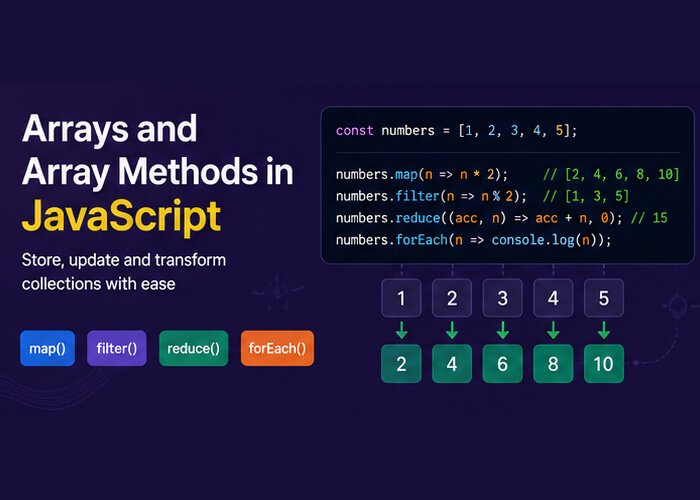
Whether you are rendering a list of products in an online store, processing test results, or filtering user comments, working with collections of data is a daily task in real-world JavaScript. In this guide, we will cover array fundamentals, explore classic mutating methods, and dive into modern, declarative methods like .map(), .filter(), and .reduce().
What is an Array?
An array is an ordered list of values. Unlike primitive data types (like numbers or strings) that hold a single value, an array can store multiple values under a single variable name.
In JavaScript, arrays are zero-indexed, meaning the first element sits at index 0.
JavaScript
// Creating an array using array literal syntax
const frameworks = ["React", "Vue", "Angular", "Svelte"];

// Accessing elements by index
console.log(frameworks[0]); // Output: React
console.log(frameworks[2]); // Output: Angular

// Checking the total number of items
console.log(frameworks.length); // Output: 4

// Accessing the last element dynamically
console.log(frameworks[frameworks.length - 1]); // Output: Svelte
Pro Tip: In JavaScript, arrays can hold mixed data types (strings, numbers, objects, and even other arrays), though keeping them homogeneous (containing the same type) is standard practice for clean code.
Essential Array Operations: Adding & Removing Elements
JavaScript provides built-in methods to modify arrays at both ends.
JavaScript
const tasks = ["Write tests", "Fix bugs"];

// 1. push() - Adds one or more elements to the END
tasks.push("Deploy release");
console.log(tasks); // ["Write tests", "Fix bugs", "Deploy release"]

// 2. pop() - Removes and returns the LAST element
const lastTask = tasks.pop();
console.log(lastTask); // "Deploy release"

// 3. unshift() - Adds one or more elements to the BEGINNING
tasks.unshift("Review PR");
console.log(tasks); // ["Review PR", "Write tests", "Fix bugs"]

// 4. shift() - Removes and returns the FIRST element
const firstTask = tasks.shift();
console.log(firstTask); // "Review PR"
Mutating vs. Non-Mutating Methods
Before diving into advanced methods, understanding mutation is critical:
Mutating methods alter the original array in place (e.g.,
.push(),.pop(),.splice(),.sort()).Non-mutating methods do not touch the original array; instead, they return a brand-new array or value (e.g.,
.slice(),.concat(),.map(),.filter()).
In modern JavaScript and frameworks like React, immutability (avoiding direct mutation) is preferred because it prevents unexpected side effects and makes state management predictable.
JavaScript
const original = [1, 2, 3, 4, 5];

// Non-mutating: slice(start, end) copies elements without altering 'original'
const subset = original.slice(1, 4);

console.log(subset);   // [2, 3, 4]
console.log(original); // [1, 2, 3, 4, 5] (unchanged)
Modern Iteration Methods (Higher-Order Functions)
Modern JavaScript favors declarative array methods over traditional for loops. These methods take a callback functionas an argument and run it on each element.
1. forEach(): Iteration for Side Effects
Use forEach when you want to loop over an array and execute an action (like logging or saving to a database) without creating a new array.
JavaScript
const users = ["Alice", "Bob", "Charlie"];

users.forEach((user, index) => {
  console.log(`${index + 1}. ${user}`);
});
// 1. Alice
// 2. Bob
// 3. Charlie
2. map(): Transforming Every Element
map() creates a new array populated with the results of calling a provided function on every element in the calling array. It always returns an array of the exact same length.
JavaScript
const pricesInUSD = [10, 25, 50, 100];
const taxRate = 1.1; // 10% tax

const finalPrices = pricesInUSD.map(price => (price * taxRate).toFixed(2));

console.log(finalPrices);
// Output: ["11.00", "27.50", "55.00", "110.00"]
3. filter(): Selecting Elements Based on a Condition
filter() evaluates each element against a boolean test. If the callback returns true, the element is included in the new array; if false, it is excluded.
JavaScript
const testScores = [45, 82, 91, 58, 74, 33];

// Keep only passing scores (>= 60)
const passingScores = testScores.filter(score => score >= 60);

console.log(passingScores);
// Output: [82, 91, 74]
4. reduce(): Accumulating to a Single Value
reduce() executes a reducer function on each element of the array, resulting in a single output value (such as a total sum, a single object, or an aggregated count).
Syntax: array.reduce((accumulator, currentValue) => { ... }, initialValue)
JavaScript
const cartItems = [
  { item: "Mechanical Keyboard", price: 120 },
  { item: "Wireless Mouse", price: 50 },
  { item: "Desk Mat", price: 25 }
];

const totalCost = cartItems.reduce((acc, currentItem) => {
  return acc + currentItem.price;
}, 0); // 0 is the initial value of 'acc'

console.log(`Cart Total: $${totalCost}`);
// Output: Cart Total: $195
Quick Search & Inspection Methods
When you need to inspect or find elements without looping manually, use these modern helper methods:
JavaScript
const scores = [10, 20, 30, 40, 50];

// 1. find(): Returns the FIRST element matching the condition
const firstHigh = scores.find(score => score > 25);
console.log(firstHigh); // 30

// 2. findIndex(): Returns the index of the first match (or -1 if none)
const index = scores.findIndex(score => score === 40);
console.log(index); // 3

// 3. includes(): Checks if a specific primitive exists (returns boolean)
console.log(scores.includes(20)); // true
console.log(scores.includes(99)); // false

// 4. some(): Checks if AT LEAST ONE element meets a condition
const hasNegative = scores.some(score => score < 0);
console.log(hasNegative); // false

// 5. every(): Checks if ALL elements meet a condition
const allPositive = scores.every(score => score > 0);
console.log(allPositive); // true
Method Chaining: The Real Power of Modern Arrays
Because non-mutating methods like .filter() and .map() return brand-new arrays, you can chain them together to perform multi-step data pipelines in readable, expressive code:
JavaScript
const employees = [
  { name: "John", department: "IT", salary: 60000, active: true },
  { name: "Jane", department: "HR", salary: 55000, active: true },
  { name: "Dave", department: "IT", salary: 80000, active: false },
  { name: "Sara", department: "IT", salary: 75000, active: true }
];

// Goal: Get the total salary budget for active IT personnel only
const totalActiveITBudget = employees
  .filter(emp => emp.department === "IT" && emp.active)
  .map(emp => emp.salary)
  .reduce((total, salary) => total + salary, 0);

console.log(`Total IT Payroll: $${totalActiveITBudget}`);
// Output: Total IT Payroll: $135000


