








Introduction
we explored how to handle ordered lists of data with Arrays and transformed them using functional methods like .map()and .filter().
While arrays are great for ordered collections, real-world data often requires context and descriptive labels. An array like ["Alex", 29, "Engineer", true] holds information, but it doesn’t clearly explain what each value represents.
This is where Objects come into play.
What is an Object?
An object is a non-primitive data structure that stores data in labeled key-value pairs (also known as properties).
Objects allow you to model complex, real-world entities like a user account, a shopping cart product, or an API response.
// Creating an object using object literal syntax
const user = {
  firstName: "Alex",
  age: 29,
  role: "QA Automation Engineer",
  isActive: true
};

console.log(user);
Accessing & Modifying Object Properties
There are two primary ways to access and manipulate properties in an object:
1. Dot Notation (object.property)
The most common and readable syntax when you know the property name ahead of time.
// Accessing
console.log(user.firstName); // "Alex"
console.log(user.role);      // "QA Automation Engineer"

// Modifying and Adding
user.age = 30;               // Updates existing property
user.country = "India";      // Adds a new property
2. Bracket Notation (object["property"])
Mandatory when the key contains special characters, spaces, or when you need to evaluate dynamic property names using a variable.
const propertyToLookUp = "role";

// Dynamic access via variable
console.log(user[propertyToLookUp]); // "QA Automation Engineer"

// Keys with spaces or special characters
const settings = {
  "dark mode enabled": true
};
console.log(settings["dark mode enabled"]); // true
Deleting Properties
To remove a property completely, use the delete operator:
delete user.isActive;
console.log(user.isActive); // undefined
Object Methods & The this Keyword
When a function is stored as a property inside an object, it is called a method. Methods allow objects to perform actions using their own internal data via the this keyword.
const vehicle = {
  brand: "Mahindra",
  model: "Scorpio",
  fuelLevel: 45, // in litres

  // Method definition
  displayStatus() {
    // 'this' refers to the vehicle object
    console.log(`${this.brand} ${this.model} has ${this.fuelLevel}L of fuel remaining.`);
  }
};

vehicle.displayStatus();
// Output: Mahindra Scorpio has 45L of fuel remaining.
Warning with Arrow Functions: Avoid using arrow functions as object methods if you plan to use
this. Arrow functions inheritthisfrom their outer lexical scope rather than binding to the object itself.
Useful Built-in Object Utility Methods
When you need to iterate through or inspect an object, JavaScript provides static Object methods that convert object data into arrays:
const serverConfig = {
  host: "localhost",
  port: 8080,
  protocol: "https"
};

// 1. Object.keys() -> returns an array of property names
console.log(Object.keys(serverConfig));
// ["host", "port", "protocol"]

// 2. Object.values() -> returns an array of property values
console.log(Object.values(serverConfig));
// ["localhost", 8080, "https"]

// 3. Object.entries() -> returns an array of [key, value] pairs
console.log(Object.entries(serverConfig));
// [["host", "localhost"], ["port", 8080], ["protocol", "https"]]
Modern ES6: Object Destructuring
Extracting values from an object manually can lead to repetitive code:
// The Old, Repetitive Way
const product = { id: 101, title: "Mechanical Keyboard", price: 120 };

const id = product.id;
const title = product.title;
const price = product.price;
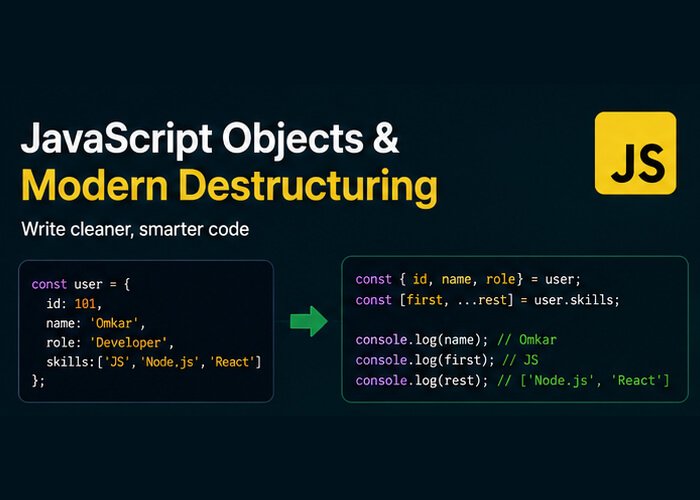
Destructuring provides a clean, concise syntax to unpack properties directly into variables.
// The Modern ES6 Destructuring Way
const { id, title, price } = product;

console.log(title); // "Mechanical Keyboard"
console.log(price); // 120
Advanced Destructuring Patterns
1. Renaming Variables (Aliases)
If you want to assign a property to a variable with a different name:
const response = { status_code: 200, data: "Success" };

const { status_code: statusCode, data: payload } = response;

console.log(statusCode); // 200
console.log(payload);    // "Success"
2. Default Values
Prevent undefined bugs by providing fallback defaults during destructuring:
const themeConfig = { theme: "dark" };

const { theme, fontSize = 16 } = themeConfig;

console.log(theme);    // "dark" (from object)
console.log(fontSize); // 16 (fallback default)
3. Nested Destructuring
Unpack values from deeply nested objects in a single line:
const employee = {
  name: "Marcus",
  department: {
    team: "Quality Assurance",
    lead: "Sarah"
  }
};

const { department: { team, lead } } = employee;

console.log(team); // "Quality Assurance"
console.log(lead); // "Sarah"
4. Destructuring in Function Parameters
Extremely common in modern JavaScript and React component props:
// Instead of accepting 'props' and writing 'props.title'
function renderCard({ title, price, isAvailable = true }) {
  console.log(`Product: ${title} | Price: $${price} | Available: ${isAvailable}`);
}

renderCard({ title: "Wireless Mouse", price: 45 });
// Output: Product: Wireless Mouse | Price: $45 | Available: true
The Spread & Rest Operators with Objects (...)
Introduced in ES9 (ES2018), the three dots ... provide powerful shortcuts for cloning, merging, and extracting remaining properties.
1. Object Spread (Shallow Copy & Merging)
Create a new copy of an object or merge multiple objects without mutating the original data:
const baseUser = { id: 1, name: "Priya" };
const userPermissions = { canEdit: true, canDelete: false };

// Merging and overriding
const fullProfile = {
  ...baseUser,
  ...userPermissions,
  role: "Admin" // add or overwrite properties
};

console.log(fullProfile);
// { id: 1, name: "Priya", canEdit: true, canDelete: false, role: "Admin" }
2. Object Rest Pattern
Collect all remaining properties into a separate object:
const testResult = {
  testId: "TC-402",
  status: "PASSED",
  durationMs: 1420,
  retries: 0,
  environment: "Staging"
};

// Extract 'status' and 'testId', group the rest into 'metadata'
const { status, testId, ...metadata } = testResult;

console.log(status);   // "PASSED"
console.log(metadata); // { durationMs: 1420, retries: 0, environment: "Staging" }


