







What is Function?
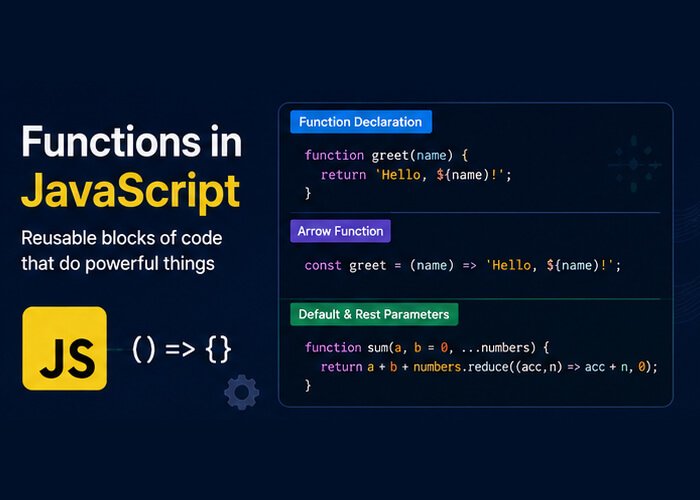
A function is a reusable block of code designed to perform a specific task. You define the instructions once, give the block a name, and then execute (or “call”) it whenever and wherever you need it.
Functions are the core building blocks of JavaScript, embodying the DRY principle: Don’t Repeat Yourself.
// Defining a function
function greetUser() {
console.log("Welcome back to the dashboard!");
}

// Calling (invoking) the function
greetUser(); // Output: Welcome back to the dashboard!
greetUser(); // Output: Welcome back to the dashboard!
Anatomy of a Function: Parameters & Arguments
Functions become significantly more powerful when you can pass data into them.
Parameters: The placeholder variables listed in the function definition.
Arguments: The actual values you pass into the function when invoking it.
// 'name' and 'role' are parameters
function displayProfile(name, role) {
console.log(`${name} works as a ${role}.`);
}

// "Alex" and "QA Engineer" are arguments
displayProfile("Alex", "QA Engineer");
// Output: Alex works as a QA Engineer.
Default Parameters (ES6)
If a caller doesn’t provide an argument, the parameter defaults to undefined. With modern ES6 syntax, you can set sensible fallback values:
function calculateDiscount(price, discountPercent = 10) {
const finalPrice = price - (price * (discountPercent / 100));
console.log(`Final Price: $${finalPrice}`);
}

calculateDiscount(100); // Uses default 10% -> Final Price: $90
calculateDiscount(100, 25); // Overrides default -> Final Price: $75
Returning Values from Functions
By default, every JavaScript function returns undefined unless specified otherwise. Use the return keyword to output a value back to the code that called it.
function addNumbers(a, b) {
return a + b;
// Any code written below 'return' will NOT execute
}

const total = addNumbers(15, 25);
console.log(total); // Output: 40

Important: The return statement immediately halts function execution and passes the resulting value back to the caller.
3 Ways to Write Functions in JavaScript
JavaScript provides multiple syntaxes to define functions. Understanding the differences is essential for reading modern codebases.
1. Function Declarations
The traditional way to define a function using the function keyword with a name.
function multiply(x, y) {
  return x * y;
}
Hoisting: Function declarations are hoisted to the top of their scope. This means you can call the function beforethe line where it is declared in your file.
sayHello(); // Works fine even though it's called before declaration!

function sayHello() {
  console.log("Hello!");
}
2. Function Expressions
In JavaScript, functions can be treated like values and assigned to variables.
const divide = function(x, y) {
  return x / y;
};

console.log(divide(20, 4)); // Output: 5
Not Hoisted: Unlike declarations, function expressions are not hoisted with their definition. You cannot call them before the line they are defined.
3. Arrow Functions (ES6)
Introduced in ECMAScript 2015 (ES6), arrow functions provide a concise syntax and are the standard in modern JavaScript and React development.
// Standard Arrow Function
const subtract = (a, b) => {
  return a - b;
};

// Implicit Return (one-line shorthand)
const square = num => num * num;

console.log(subtract(10, 4)); // Output: 6
console.log(square(5));        // Output: 25
Key Rules for Arrow Functions:
If there is only one parameter, parentheses
()are optional (num => ...).If the function body consists of a single expression, you can omit curly braces
{}and thereturnkeyword for an implicit return.Arrow functions do not have their own
thisbinding (they inheritthisfrom their enclosing lexical context).
Function Scope: Local vs. Global
Variables created inside a function are locally scoped to that function. They cannot be accessed from the outside world.
const globalMessage = "I am accessible anywhere";

function testScope() {
  const localSecret = "I only exist inside this function";
  console.log(globalMessage); // Works: reads outer scope
  console.log(localSecret);   // Works: reads local scope
}

testScope();

console.log(localSecret);
// ReferenceError: localSecret is not defined
This encapsulation prevents different parts of your program from accidentally overwriting each other’s data.
First-Class Citizens: Passing Functions as Arguments
In JavaScript, functions are first-class citizens, meaning they can be:
Stored in variables.
Passed as arguments to other functions (often called callbacks).
Returned from other functions.
function formatLog(message, formatterCallback) {
  const formatted = formatterCallback(message);
  console.log(formatted);
}

const upperCaseFormatter = str => `[LOG]: ${str.toUpperCase()}`;

formatLog("server connection successful", upperCaseFormatter);
// Output: [LOG]: SERVER CONNECTION SUCCESSFUL
This concept forms the foundation for working with arrays (.map(), .filter()) and handling asynchronous events.


